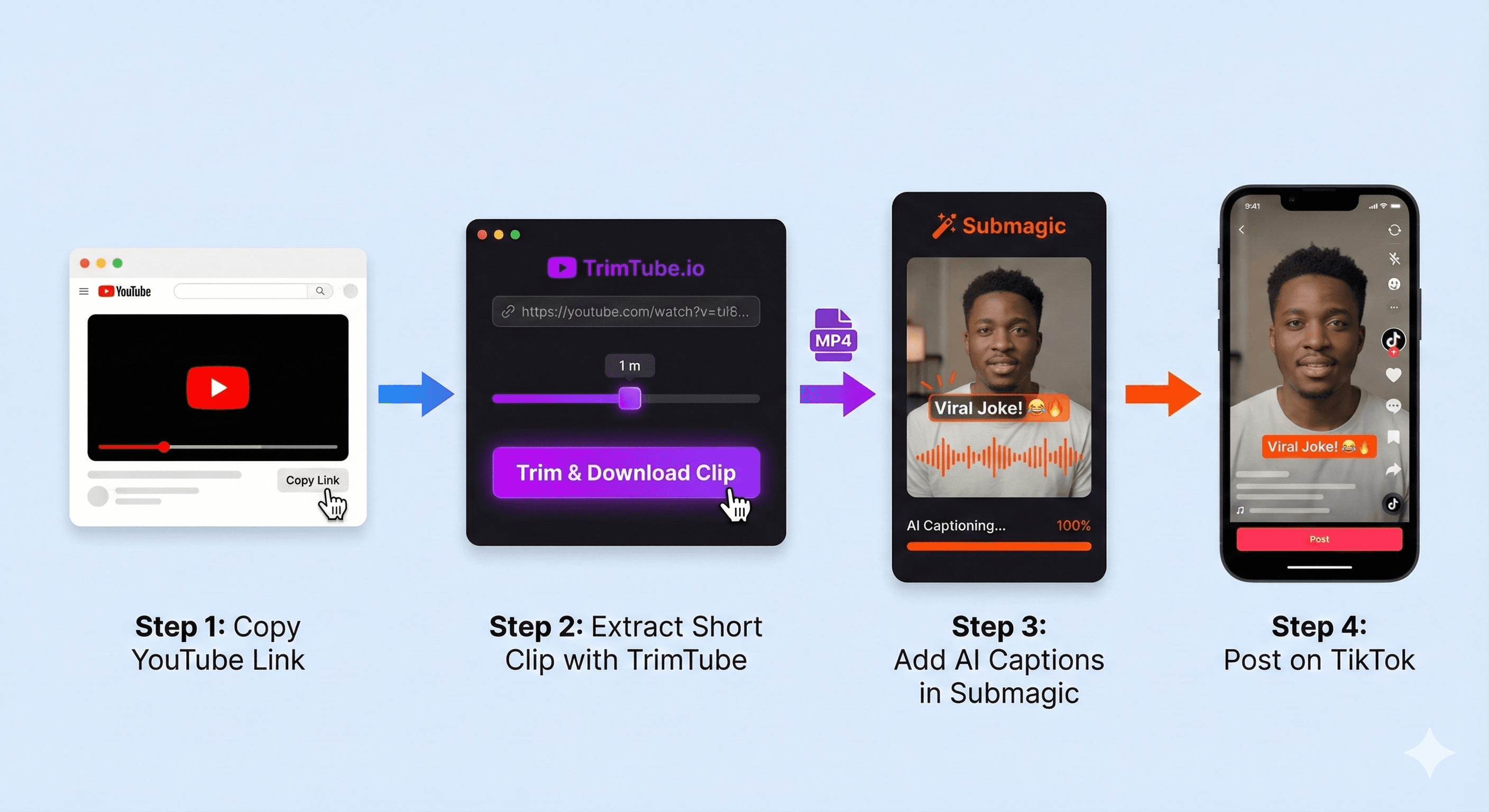
Stop struggling with massive video files. Here is the 'Hybrid Workflow' using TrimTube and Submagic to create viral vertical content in minutes.
How to Turn YouTube Videos into TikToks & Shorts (2026 Workflow)
Summary: Stop struggling with massive video files. Here is the "Hybrid Workflow" using TrimTube and Submagic to create viral vertical content in minutes without downloading 2GB files.
What You’ll Learn
- Why the "Hybrid Workflow" (Manual Clip + AI Edit) beats expensive all-in-one tools.
- How to extract high-quality raw clips without downloading 2GB files.
- Step-by-Step: The TrimTube → Submagic/CapCut pipeline.
- Research Fact: Why "Bitrate" matters for the TikTok algorithm.
1. The "Viral" Problem: Quality vs. Speed
Repurposing content will be the single biggest growth hack in 2026. You have a 2-hour podcast or a 30-minute gaming video, and hidden inside are five or six viral 60-second moments.
But here is the friction point most creators face:
- The "Heavy" Way: Downloading a 4GB video file just to import it into Premiere Pro is slow and kills your storage.
- The "Lazy" Way: Using fully automated AI clippers often misses the joke, cuts the context, or lowers the resolution.
The Solution? The Hybrid Workflow. You need human intuition to pick the moment, and AI to handle the polish.
💡
Research Insight: According to a Microsoft attention study, you have 8 seconds to hook a viewer. If your clip starts with 3 seconds of silence because an AI tool cut it poorly, you've already lost the swipe. Precision is everything.
2. The 2026 Workflow: TrimTube + Submagic
We recommend a two-step stack that maximizes quality and minimizes effort.
The Stack:
- Extraction: TrimTube Use this to get the clean, high-bitrate raw file. (See why we are rated the Best YouTube Clip Downloader for 2026 for clean extraction).
- Editing: Submagic or CapCut Use these to add dynamic captions, b-roll, and zooms.
Why this order? Because tools like Submagic work best when you feed them short, high-quality clips. Uploading a 2-hour video to them often causes crashes or costs a fortune in credits.
3. Step-by-Step Guide
Here is how to go from "Long-Form YouTube" to "Viral Short" in under 5 minutes.
1
Find Your 'Hook' on YouTube
Don't just download the whole video. Watch it on YouTube and find the exact timestamp where the interesting part starts.
2
Extract the Source Clip with TrimTube
Paste the YouTube link into TrimTube.
- Why here? We process the video in the cloud. You get a crisp 1080p MP4 of just that 60-second segment.
- Benefit: You are now working with a 15MB file, not a 2GB file.
3
Upload to Submagic/CapCut
Take your lightweight TrimTube clip and drop it into your editor.
- For Submagic Users: The AI will now generate captions instantly because the file is small and focused.
- For CapCut Users: You can easily add zooms and music without your phone lagging from a heavy file.
4
Check the 'Safe Zones'
Before exporting, ensure your captions aren't covered by the TikTok interface (the like button, caption text, etc.). Keep text in the center-middle 50% of the screen.
⚠️
Technical Note on Quality: TikTok compresses videos heavily. If you start with a low-quality screen recording, your final post will look pixelated. Always start with a direct download file (like TrimTube provides) to give the algorithm the highest possible bitrate.
4. Comparison: The Hybrid Workflow vs. Alternatives
Why not just use an "All-in-One" AI tool?
| Feature | TrimTube + Submagic (Hybrid) | OpusClip / Munch (Full AI) |
|---|---|---|
| Cost | Free / Low Cost | $30 - $50 / month |
| Control | ✅ You pick the exact joke/moment | ❌ AI guesses the moment |
| Quality | ✅ 1080p Source Control | ⚠️ Often compressed |
| Speed | ⚡ Fast (Processing small files) | 🐢 Slow (Processing 1hr+ videos) |
| Storage | ✅ No storage waste | ❌ Requires huge uploads |
5. FAQ (Creator Questions)
Yes. If you are clipping someone else's podcast (like Joe Rogan or a streamer), it is best practice—and often required for Fair Use—to tag the original channel in your caption.
6. Final Thoughts
The creators winning in 2026 won't be working harder; they'll be working with better data.
They know that a lightweight, high-quality source clip is the foundation of a viral video. Use TrimTube to get the raw material, and use AI to polish it. That is how you scale.
Start your viral workflow: Get your raw clips in seconds. Try TrimTube for Free
Dec 03, 2025
6 min read
Start trimming YouTube videos
Upload your YouTube link and trim clips with frame-accurate precision. Create clean highlights, cut exact moments, and download watermark-free clips — all in your browser.
Start trimming for freeFastest Youtube Clips Downloader
Trim YouTube videos
faster than any online editor.
Paste a YouTube link, pick the exact moment you need, and download a clean, watermark-free clip — no login, no installs, no friction.
© 2026 TrimTube.io. All rights reserved.